Day Breaks
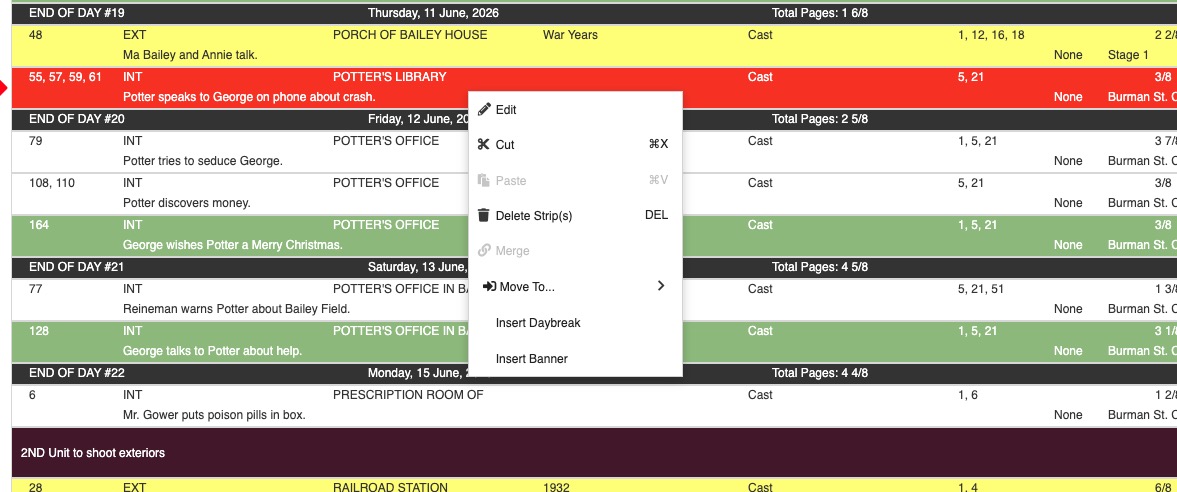
Day Breaks divide your Strips into working days, relying on the Start Date for the current Sub-Board as defined in the Calendar tab. Day Breaks are unique to one specific Board. They're not shared across all Boards in your Schedule.
Day Breaks show:
- The day number (based on the number of Day Breaks in the current Sub-Board).
- The date of that day.
- The total Page Count and Estimated Time (Shoot Time) for all the Strips in the day (above the Day Break).
- Any additional fields you configure on the Day Break banner, including Sunrise, Sunset, Screen Time, Custom Text, Space, and Element Quantity. See Strip Display: Day Break Fields for the full list and how to add them.
A Shoot Day strip appears above each Day Break, linked to it and showing the production's shoot-day count. See Strip Display: Shoot Days for details on Shoot Day strips.
Important
Day Breaks can be moved, deleted, and used in any Sub-Board or the Boneyard, just like Strips. The linked Shoot Day strip moves with the Day Break and cannot be moved independently.
To Add a Day Break
- Select a Strip in your current Sub-Board.
-
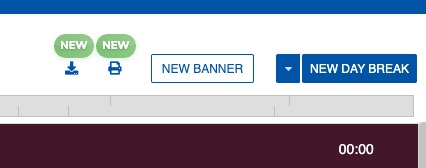
Click the + DAY BREAK option in the menu at the top of the Board.
-
The new Day Break will display below the selected Strip.
Note
To insert a Day Break directly above or below a specific Strip, right-click the Strip and choose Insert Daybreak > Above or Below. See Right-Click Context Menu.
To Automatically Add or Change Multiple Day Breaks
In a shooting schedule, you can automatically insert Day Breaks based on the number of script pages per day, the length of the shooting day, or the total timing.
-
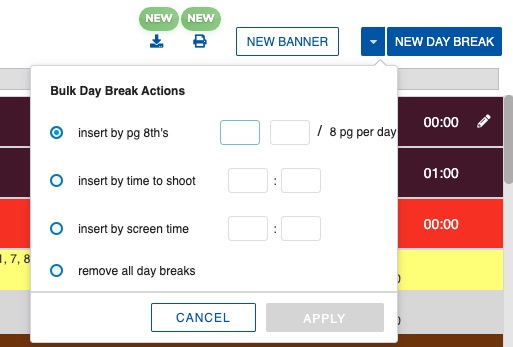
Click the DOWN ARROW next to the + DAY BREAK option in the menu at the top of the Board.
-
Select an option: Insert by pg 8ths, Insert by shoot time, Insert by screen time, or Remove all day breaks.
- Enter the value for the max pg 8ths, shoot time duration, or screen time duration you want each day to contain (if applicable).
- Click APPLY. Current Day Breaks will be removed from the Sub-Board, and if inserted, new ones will be added.
Note
You can customize the layout of Day Breaks in the Strip Designer.
To Delete All Day Breaks
- Click the DOWN ARROW next to the + DAY BREAK option.
-
Select Remove all day breaks and click APPLY.