Breakdown Sheet / Board
The Board/Breakdown Sheet option lets you view the Breakdown Sheet and its corresponding strip at the same time.
When you select this option:
- The left panel displays the Breakdown Sheet.
- The right panel displays the Board.
- The strip shown is directly linked to the breakdown sheet you are viewing.
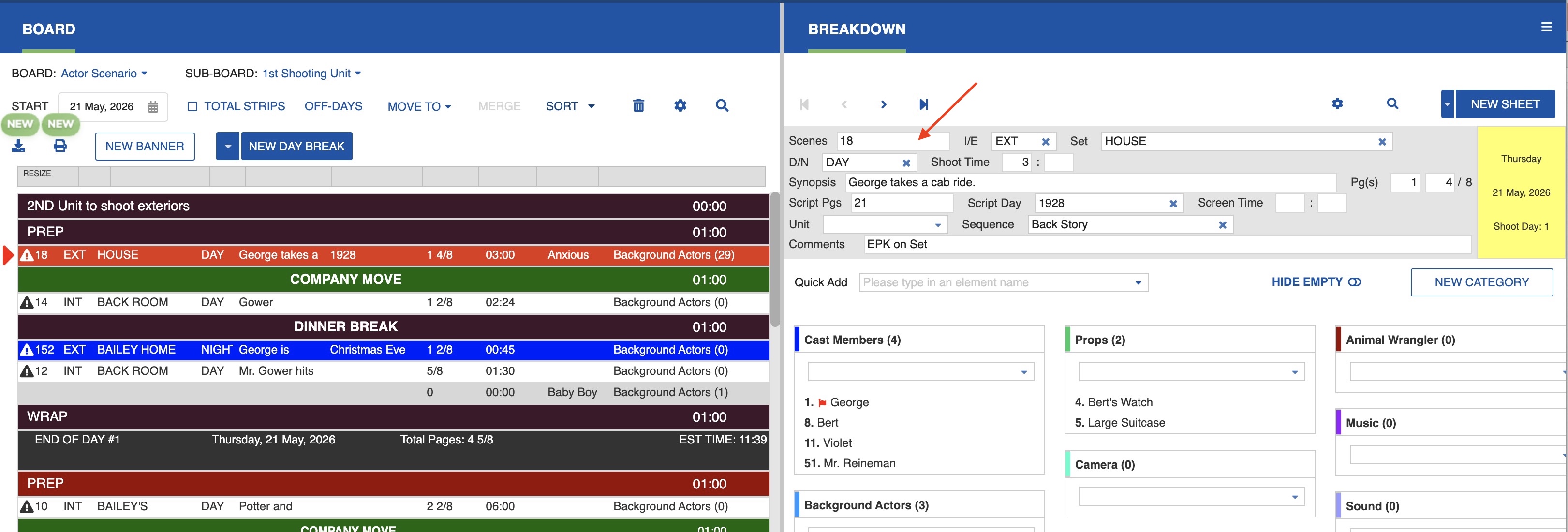
Navigating in the Board / Breakdown Split Screen
Select the desired Board and Sub-Board, then click the strip to display its breakdown sheet.
Double-click a strip in a split-screen view to land in Board and Breakdown, with the breakdown beside the strip you clicked.
This view is especially helpful when:
- Checking that all elements (cast, props, locations, etc.) are correctly attached to a strip.
- Making changes to a breakdown while immediately seeing the strip it affects.
- Verifying scene details without switching back and forth between windows.
- Adjusting scene information during scheduling.
Any edits you make in the Breakdown Sheet will immediately reflect in the associated strip, since both panels are part of the same schedule.